CrackStreams Alternatives: Sports Streams & Offline Watching

CrackStreams constantly changes domains, faces legal takedowns, and frequently goes offline right before major NFL or MMA events. Because unauthorized free streaming sites operate without official broadcasting rights, their servers are routinely seized or easily overwhelmed by traffic during big matches.
If you are tired of staring at a frozen screen during the main event, it is time to move away from frustrating free sites and explore reliable, legal sports streaming options.

1. The Hidden Costs of Free Sports Streaming Sites
Is it safe to keep using free sports streaming sites? While the lack of a subscription fee is appealing, the hidden costs of unauthorized sites often outweigh the benefits. Relying on unofficial platforms exposes you to a range of technical frustrations and security risks:
- Aggressive Pop-up Ads and Malware Risks: Free streaming sites are notorious for malicious ads, fake download buttons, and browser hijackers that put your personal data and device security at risk.
- Constant Buffering and Crashes: Unofficial servers cannot handle the massive web traffic generated during high-profile MMA fights, boxing matches, or NFL playoffs, leading to buffering right when the action peaks.
- No Reliable Replays: If you miss the live broadcast due to time zones or a busy schedule, free sites rarely offer full, stable match replays to watch later.
Moving away from these unsafe platforms is the only way to ensure you actually get to watch the game without putting your computer at risk.
2. Best Legal CrackStreams Alternatives for Live Sports
What are the most reliable legal sports streaming platforms? To avoid the buffering and malware of free sites, switching to official broadcasters is the best choice. These paid platforms secure the rights to air matches in high quality without the risk of sudden takedowns.

Here are the top legal CrackStreams alternatives for live sports streaming:
| Platform | Key Sports Covered | Max Resolution |
|---|---|---|
| Peacock | NFL, WWE, Premier League, Olympics | Up to 1080p |
| Paramount+ | NFL, UEFA Champions League, Serie A | Up to 1080p |
| YouTube TV | NFL Sunday Ticket, NBA, MLB, College Sports | Up to 8K (depending on source) |
| ESPN+ | UFC/MMA, NHL, College Football, Boxing | Up to 1080p |
These paid platforms provide a stable feed and clear picture, making them the best choice for uninterrupted live sports. Once you subscribe to an official service, you will likely want to watch matches on the go.
Reviewing a Peacock download guide or similar platform resources can help you understand how to navigate specific app limitations before you rely on them for offline viewing.
3. The Problem with App-Only Sports Replays
If you want to download a full match replay or a collection of highlights for a long flight, you will quickly run into app-only limitations. Official apps frequently lock offline viewing behind premium subscription tiers.
Even if you have the right plan, your app-based downloads will expire shortly after you hit play-or disappear entirely if the platform loses the broadcasting rights. Because these videos cannot be transferred to other devices, you are stuck watching on a small screen without the flexibility to build a personal offline library.
4. The Offline Companion for Your Legal Sports Replays
How can I save sports highlights and replays as local files? To solve the problem of expiring app downloads, you need a way to move from app-only viewing to file-based freedom. Keeprix Video Downloader is the ideal offline companion for your legal sports streaming platforms.
Keeprix allows you to save YouTube sports highlights or supported platform replays as flexible MP4 or MKV files. By using this local-file workflow, you can build your own offline library and prepare your sports watchlists before traveling, commuting, or facing poor internet connections.

Download Sports Videos with Keeprix
- Download sports videos on Windows & Mac.
- Save sports videos as local MP4/MKV files.
- Batch download sports videos like FIFA World Cup.
- Watch sports videos offline, no interruption.
4.1 How to Prepare Your Offline Sports Watchlist
How do I use Keeprix to save a sports replay? Preparing your offline sports watchlist before you travel is straightforward. Download and install Keeprix (100% safe & secure) to your computer. Then follow these steps to build your local media library:
Step 1. Open Keeprix on your Windows or Mac and use the built-in browser to log into a supported legal platform (such as Netflix, Peacock, Paramount+, or YouTube).
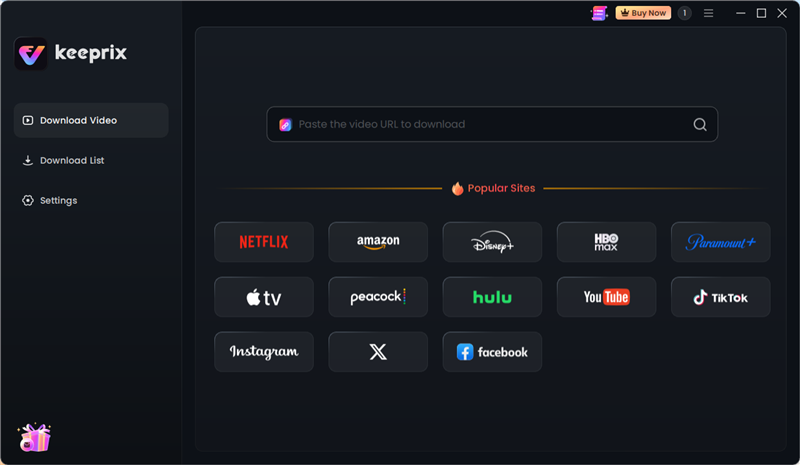
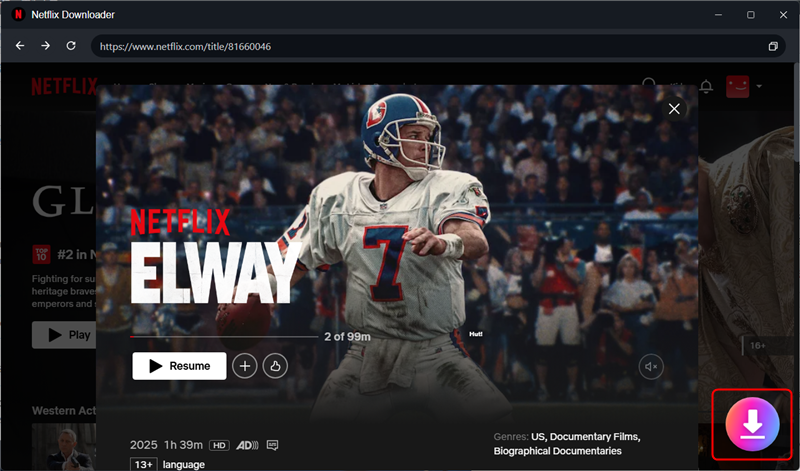
Step 2. Navigate to the accessible match replay, VOD, or highlight video you want to save. Click the Download icon in right corner.
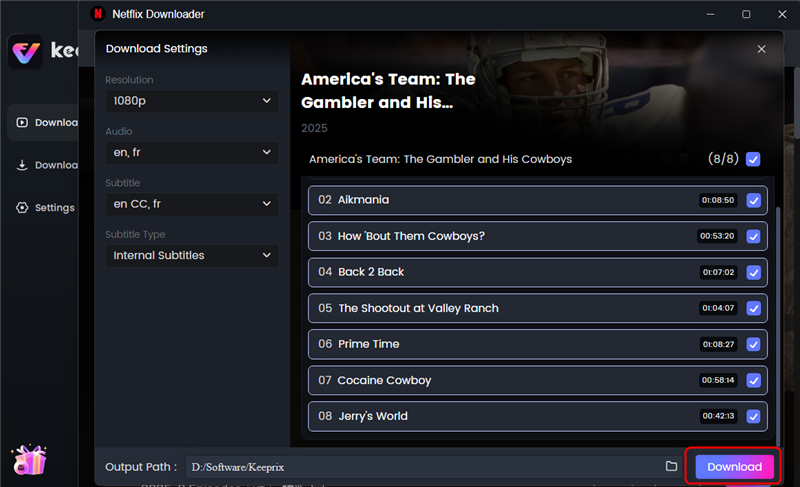
Step 3. Select your preferred output format (MP4 or MKV) and choose to preserve available audio tracks and subtitles depending on the source video quality. Then click the Download button to start downloading.
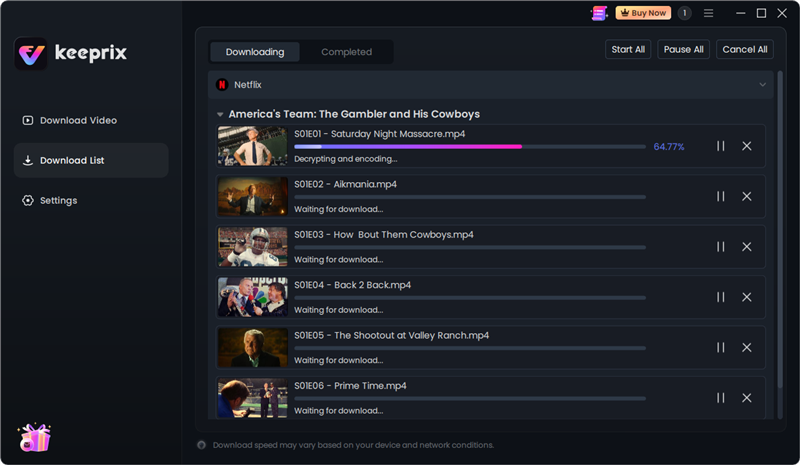
Step 4. Then you’ll see the downloading list. Once the download is complete, you can transfer the MP4 file to your tablet, external drive, or smart TV. You are now ready for your commute, flight, or weekend trip with a full offline collection of sports replays.
Frequently Asked Questions
What happened to CrackStreams?
CrackStreams frequently goes down due to legal takedowns and server seizures because it broadcasts copyrighted sports without permission, forcing it to constantly change domain names.
Is CrackStreams safe to use?
No. Free, unauthorized sports streaming sites expose users to severe malware risks, aggressive pop-up ads, and browser hijackers.
What is the best alternative to CrackStreams for MMA and NFL?
The best legal alternatives are ESPN+ for UFC/MMA, and Peacock, Paramount+, or YouTube TV for reliable, high-quality NFL live streams.
Are free sports streaming sites legal?
Hosting unauthorized sports broadcasts violates copyright laws. Using these platforms is unsafe and often breaches your internet service provider’s terms of service.
How can I watch sports offline safely?
You can watch sports offline by downloading replays through official streaming apps (though they may expire) or by saving accessible replays to your local device to download protected videos offline using local-file tools for personal use.
Can I save sports highlights as MP4 files?
Yes. For videos you can legally access on supported platforms, desktop tools like Keeprix can save sports highlights and match replays as MP4 or MKV files for flexible offline viewing.
The Bottom Line
By complementing your legal platforms with Keeprix, you can save accessible replays and highlights as local MP4 or MKV files. Keeprix offers a free trial that allows you to save up to 2 full videos, giving you a risk-free way to test your offline workflow before deciding to upgrade. Try Keeprix today to turn app-only viewing into file-based freedom, and build a personal sports media library you can watch on the screen you actually use.
Keeprix Video Downloader
Download sports videos in MP4/MKV. Enjoy seamless offline watching on Windows and Mac.