The Best Video Downloader for Amazon Prime: Build Your Offline Library

The best video downloader for Amazon Prime depends on what you need to test before paying. Keeprix is the strongest all-in-one choice for users who want one complete Prime Video download in the free version and support for other streaming platforms in the same app. StreamFab offers a larger three-title trial for its Amazon module, while TunePat and Kigo provide more clearly documented codec and subtitle controls. MovPilot is worth considering if a six-minute trial is enough to check output quality, and Free Amazon Prime Download is the main no-cost Windows-only option in this comparison.
If you only need temporary offline playback inside the Prime Video app, start with Amazon’s official download feature. A third-party desktop tool becomes relevant when you specifically need a standard MP4 or MKV file, cross-device playback, selectable audio or subtitles, or a batch queue for supported titles you are already authorized to watch.
Quick Picks: Which Prime Video Downloader Fits You?
- Best for a complete free test across multiple services: Keeprix
- Best Amazon-only full-title trial: StreamFab Amazon Downloader
- Best documented subtitle and codec controls: TunePat Amazon Video Downloader
- Best straightforward Amazon-focused alternative: Kigo Amazon Prime Video Downloader
- Best if a six-minute trial is enough: MovPilot Amazon Prime Video Downloader
- Best no-cost option for Windows users willing to verify the licensing terms: Free Amazon Prime Download
These labels describe the clearest use case for each product, not a universal performance ranking. A downloader can stop working temporarily after a Prime Video update, and actual quality depends on the title, account, region, source stream, and current software compatibility.
How We Compared These Amazon Prime Video Downloaders
Disclosure: Keeprix publishes this guide and develops Keeprix Video Downloader. To keep the comparison useful, competitor specifications, trial limits, system requirements, and displayed prices were checked against official vendor pages on October 28, 2026. Prices exclude possible taxes and may change after publication.
This is a source-verified comparison, not a claim that every competitor was tested under identical laboratory conditions. We therefore do not assign invented star ratings, success rates, or download-speed scores. When a speed figure comes from a vendor, it is identified as a vendor claim.
We focused on the factors that affect an actual purchase decision:
- Trial usefulness: Can you test a complete title, or only the first few minutes?
- Prime Video output: Does the tool list MP4 or MKV and up to 1080p for supported Prime titles?
- Audio and subtitles: Can it preserve available language tracks, 5.1 audio, or separate subtitle files?
- Operating system: Does it support your current Windows or macOS version?
- Library workflow: Does it offer batch selection, multiple services, or an Amazon-only module?
- Pricing clarity: Are the current license and trial limits clearly published?
Official Prime Video Downloads: The Baseline
Before installing another tool, check whether Amazon’s official option already solves your problem. Amazon supports downloads through compatible Prime Video apps, including Fire tablets and apps for iOS, Android, macOS, and Windows 10/11. Eligible titles can be downloaded for offline playback, and TV shows may offer a full-season download option.
However, official downloads remain app-managed rather than becoming portable MP4 or MKV files. Amazon’s Prime Video Usage Rules state that subscription downloads typically give you 30 days to begin watching and, once playback starts, typically 48 hours to finish. Availability and limits can differ for subscriptions, rentals, purchases, add-on channels, titles, devices, and regions.
Choose the official app if: you want the safest supported method, do not need a transferable file, and can finish within the title’s displayed viewing window.
Amazon Prime Video Downloader Comparison
| Tool | Best For | OS | Prime Video Output | Audio / Subtitles | Batch |
|---|---|---|---|---|---|
| Keeprix | One app for Prime Video and other streaming services | Windows 10/11; macOS 12+ | MP4/MKV; up to 1080p | Available audio tracks and subtitles | Yes, after activation |
| StreamFab Amazon Downloader | Testing several complete Amazon titles | Windows; macOS 12+ | MP4/MKV; up to 1080p | AAC/EAC3 5.1 and subtitle options listed | Yes |
| TunePat Amazon Video Downloader | Codec and subtitle control | Windows 10+; macOS 11+ | MP4/MKV; up to 1080p; H.264/H.265 | AAC/EAC3 5.1; SRT/VTT; three subtitle modes | Yes |
| Kigo Amazon Prime Video Downloader | A dedicated Amazon-focused desktop tool | Windows 10/11; macOS 11+ | MP4/MKV; up to 1080p; H.264/H.265 | AAC/EAC3 5.1; SRT/VTT; three subtitle modes | Yes |
| MovPilot Amazon Prime Video Downloader | Checking output with a short trial clip | Windows; macOS | MP4/MKV; up to 1080p | Available multilingual tracks and subtitles | Yes |
| Free Amazon Prime Download | Windows users prioritizing a no-cost tool | Windows 7 SP1+ | Up to 1080p; container details are not clearly stated | TTML/SRT subtitles listed | Multiple simultaneous downloads listed |
Trial and Price Snapshot
| Tool | Free Evaluation | Displayed Price Checked October 28, 2026 |
|---|---|---|
| Keeprix | 1 complete video per supported streaming platform | $49.99/month; $99.99/year; $159.99 lifetime |
| StreamFab Amazon Downloader | 3 complete Amazon videos during a 30-day trial | $54.99/month; $99.99 lifetime |
| TunePat Amazon Video Downloader | First 5 minutes of each video | $69.90 lifetime promotional price |
| Kigo Amazon Prime Video Downloader | First 5 minutes of each video | $79.90 displayed purchase price |
| MovPilot Amazon Prime Video Downloader | First 6 minutes of each video | $59.95/year; $89.95 lifetime |
| Free Amazon Prime Download | Official page describes the app as free | Pricing is unclear; the same page also mentions a one-year license |
Important: Promotional prices, refund windows, download quotas, and supported versions can change. Confirm the current terms on each vendor’s checkout and help pages before purchasing.
Detailed Reviews of the 6 Best Amazon Prime Video Downloaders
1. Keeprix Video Downloader: Best for a Full-Length Test Across Multiple Services
Keeprix Video Downloader is an all-in-one Windows and Mac application rather than an Amazon-only module. For supported Prime Video titles, it can save videos as MP4 or MKV files in up to 1080p when the source quality and current technical conditions allow. It also supports available audio tracks and subtitles.
The main difference is the trial structure. Keeprix allows one complete video from each supported streaming platform, so you can inspect an entire movie or episode instead of a short preview. That makes it easier to verify subtitle timing, audio selection, file size, and playback on the device you actually use. The activated version removes Keeprix’s one-video streaming trial limit and enables batch downloading, subject to platform availability and other applicable restrictions.
Pros:
- One full-length Prime Video download in the free version.
- MP4 and MKV output with up to 1080p for supported Prime titles.
- Works with Prime Video plus Netflix, Disney+, Hulu, Max, Apple TV+, Paramount+, Peacock, and supported social sites.
- Windows 10/11 and macOS 12 or later.
- Batch downloading, available audio tracks, and subtitles after activation.
Cons:
- The paid plans cost more than some Amazon-only tools.
- There is no Android, iOS, or browser-only version.
- Actual availability and quality depend on the title, account access, region, source, and current compatibility.
Keeprix Video Downloader
Save supported Prime Video titles as local MP4 or MKV files in up to 1080p. Test one complete Prime Video before upgrading.
2. StreamFab Amazon Downloader: Best Amazon-Only Full-Title Trial
StreamFab Amazon Downloader is sold as an Amazon-specific module, with broader bundles available separately. Its official product information lists MP4/MKV output, up to 1080p, EAC3 5.1 or AAC 2.0 audio options, subtitle support, and batch downloads.
The strongest evaluation advantage is a 30-day trial that allows up to three complete downloads per service. That gives users more full-length material to test than the minute-limited trials offered by several competitors. The tradeoff is licensing complexity: the Amazon module, browser product, customized bundles, and All-In-One package have different prices and coverage.
Pros:
- Three complete Amazon downloads during the stated trial period.
- MP4/MKV, up to 1080p, audio options, subtitles, and batch processing.
- Standalone Amazon module available for users who do not need every service.
Cons:
- The Amazon-only module and multi-service bundles are separate purchasing decisions.
- The official requirements list substantial free disk space.
- Daily and weekly download quotas apply even to licensed accounts.
3. TunePat Amazon Video Downloader: Best for Subtitle and Codec Controls
TunePat Amazon Video Downloader provides particularly detailed technical specifications. It lists MP4 and MKV output, 720p/1080p quality, H.264 and H.265 codecs, AAC and EAC3 5.1 audio, plus SRT or VTT subtitles. Subtitles can be saved internally, externally, or hardcoded.
TunePat also advertises batch downloading and up to 10x speed, but the speed figure is a vendor claim rather than a result verified for this article. Its free version saves only the first five minutes of a video, which is enough to inspect basic picture and sound but not enough to check a complete movie, end credits, or subtitle consistency throughout an episode.
Pros:
- Clear H.264/H.265, audio, and subtitle-format documentation.
- Three subtitle modes and support for many interface languages.
- Windows 10+ and macOS 11+ versions.
Cons:
- The trial is limited to the first five minutes of each title.
- The displayed lifetime price is promotional and may change.
- A short trial cannot confirm full-title reliability.
4. Kigo Amazon Prime Video Downloader: Best Straightforward Amazon-Focused Alternative
Kigo Amazon Prime Video Downloader has a feature set close to TunePat: MP4/MKV, up to 1080p, H.264/H.265, AAC or EAC3 5.1, SRT/VTT subtitles, three subtitle modes, and batch selection. It supports Windows 10/11 and macOS 11 or later.
Kigo advertises up to 10x speed and support for multiple Amazon regions. However, its official product and FAQ pages do not describe regional portals in exactly the same way. If your account uses PrimeVideo.com rather than a country-specific Amazon domain, test the free version with your own account before purchasing. The trial is limited to the first five minutes of each video.
Pros:
- Detailed format, codec, audio, and subtitle controls.
- Batch support and a dedicated Amazon workflow.
- Current Windows and macOS compatibility is clearly listed.
Cons:
- Only five minutes of each title are available in the trial.
- Official documentation contains inconsistent wording about supported Amazon regions.
- It is less attractive if you need one license for several streaming services.
5. MovPilot Amazon Prime Video Downloader: Best If a Six-Minute Trial Is Enough
MovPilot Amazon Prime Video Downloader lists MP4/MKV output, up to 1080p, batch downloads, and preservation of available multilingual audio and subtitles. It is available for Windows and macOS.
MovPilot’s free version saves the first six minutes of a movie or episode. That is slightly longer than the five-minute trials from TunePat and Kigo, but it still does not provide a complete-title test. Its own pricing pages list an annual and lifetime plan, and the vendor also sells multi-product and all-in-one bundles.
Pros:
- MP4/MKV, up to 1080p, batch selection, audio, and subtitles.
- Six-minute trial is enough for a basic output inspection.
- Annual and lifetime licensing options are listed.
Cons:
- No complete video is available in the free version.
- Prices and promotional discounts vary across the vendor’s store and editorial pages.
- Check the exact supported OS and one-computer license terms at checkout.
6. Free Amazon Prime Download: Best No-Cost Windows Option, with Caveats
Free Amazon Prime Download is a Windows-only tool from FreeGrabApp. Its official page lists up to 1080p, simultaneous downloads, pause/resume controls, and TTML or SRT subtitles. It works on Windows 7 SP1 and later.
The main attraction is price: the product page repeatedly describes the application as free. However, the same page also states that one license covers a one-year subscription for one PC, without clearly explaining when that license is required or displaying a price. The page also does not document MP4/MKV output as clearly as the other vendors. Treat it as an option to test, not as a fully transparent recommendation.
Pros:
- Advertised as free by the vendor.
- Up to 1080p, subtitles, and multiple simultaneous downloads are listed.
- Supports older Windows computers.
Cons:
- No native macOS version.
- The official page’s “free” and one-year-license wording is unclear.
- Output-container and current licensing details are less transparent than the other options.
Which Amazon Prime Video Downloader Should You Choose?
Choose based on the result you need, not a generic “best” label:
- Stay with the official Prime Video app if temporary app-based viewing is enough and you do not need to move the file.
- Choose Keeprix if you want to test one complete Prime Video and also use the same app with other supported streaming or social platforms.
- Choose StreamFab if testing three complete Amazon titles matters more than having the lowest paid price.
- Choose TunePat if documented codec and subtitle controls are your main priority.
- Choose Kigo if you want a focused Amazon desktop tool and your regional portal works in its trial.
- Choose MovPilot if a six-minute output sample is sufficient and its annual or lifetime plan fits your budget.
- Try Free Amazon Prime Download cautiously if you need a Windows-only no-cost option and are comfortable confirming its unclear license terms yourself.
How to Download a Prime Video with Keeprix
You need an active account and authorized access to the title. Keeprix cannot provide access to videos that are unavailable to your account, and results depend on the title, region, source stream, and current technical compatibility.
Step 1: Install Keeprix on a compatible Windows 10/11 computer or Mac running macOS 12 or later. Open the app, select Amazon Prime Video, and sign in through the built-in browser.
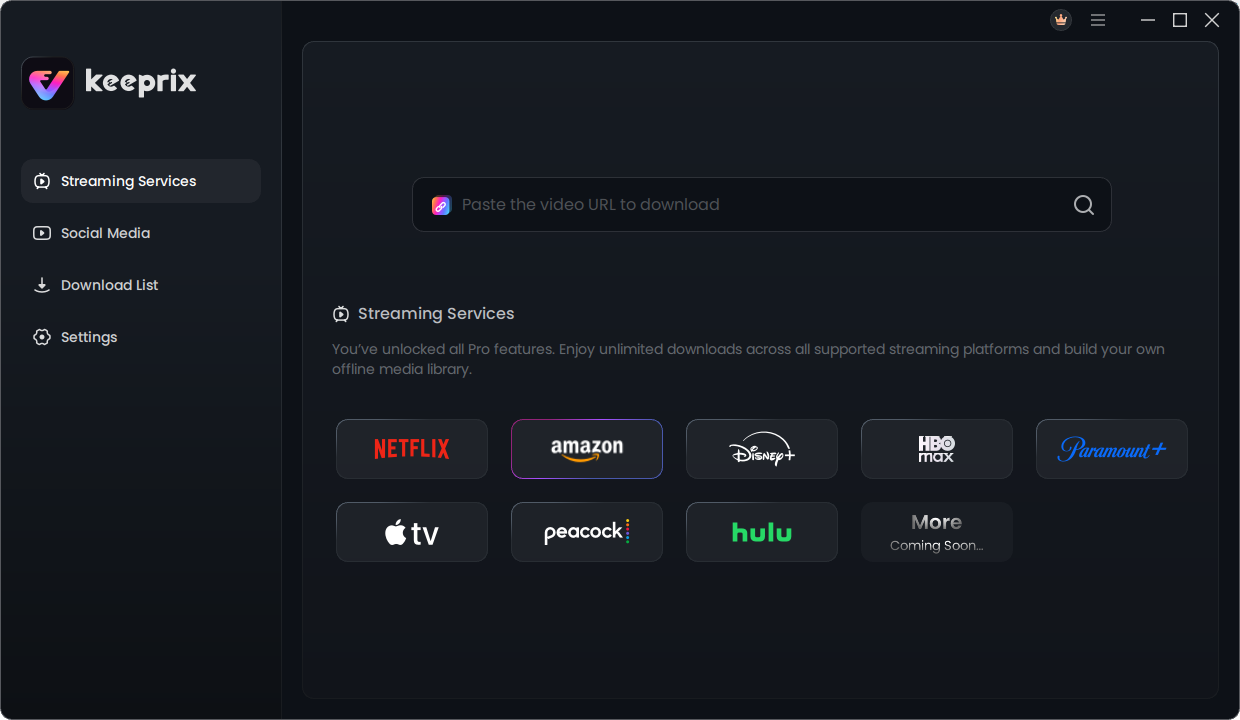
Select Amazon Prime in Keeprix Video Downloader
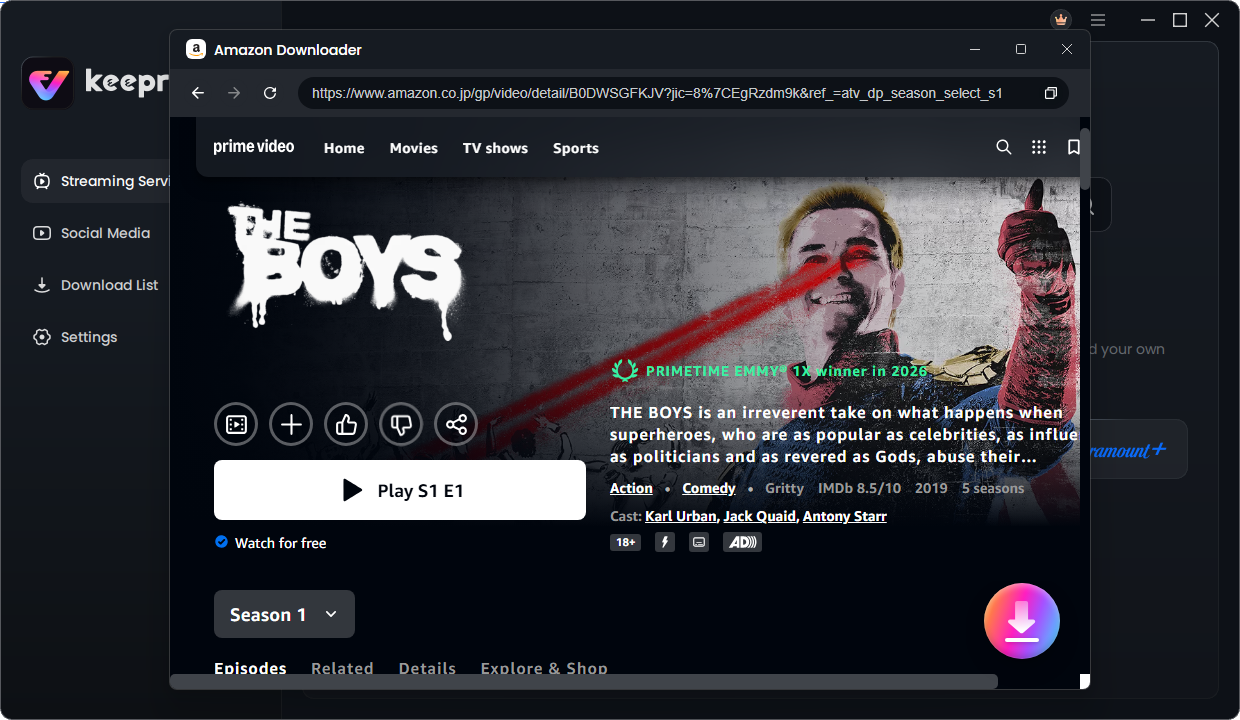
Step 2: Search for a movie or TV show that is currently available to your account, then open its details page and select the download option.
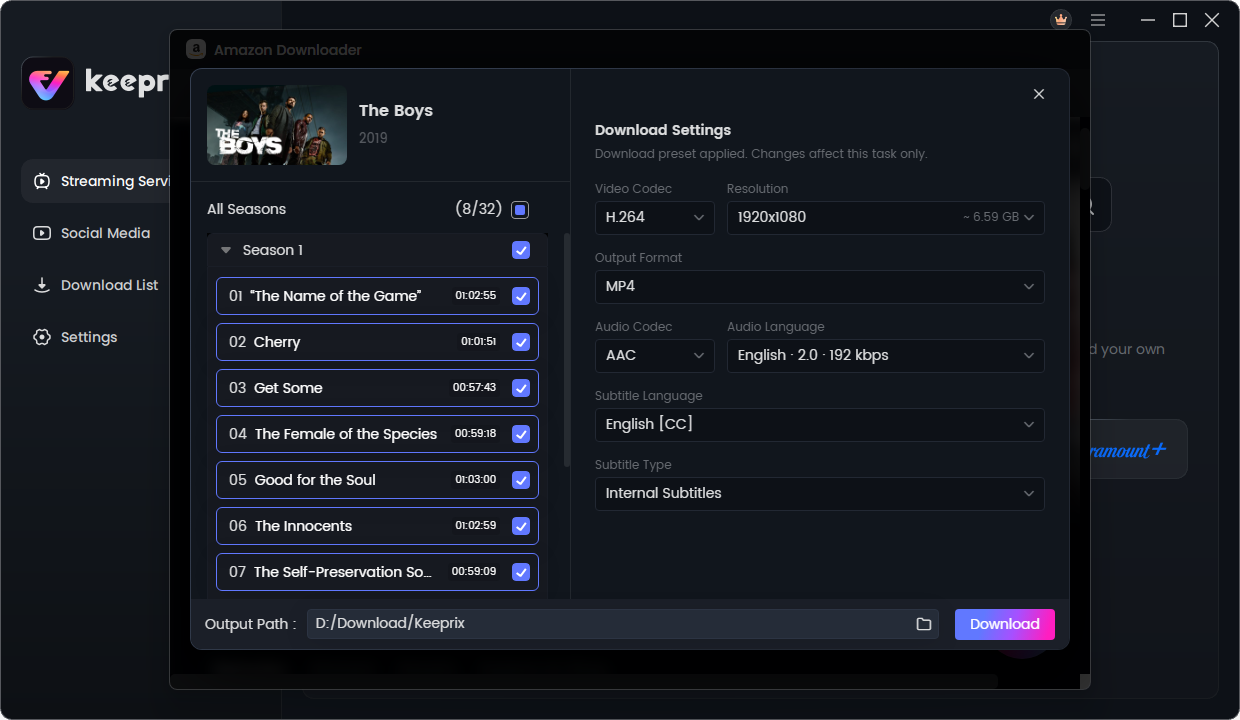
Step 3: Choose MP4 or MKV, an available resolution up to 1080p, the audio and subtitle tracks you need, and an output folder. Start the download and test the completed file in your usual media player.
Keeprix provides one complete free Prime Video download. Use it to verify picture quality, audio, subtitles, file size, and playback compatibility before upgrading or preparing a larger batch.
Why Online Downloaders, Extensions, and Screen Recorders Are Different
A website or browser extension may look convenient because it requires no desktop installation, but many generic tools cannot process app-managed Prime Video streams reliably. Never enter your Amazon password into an unfamiliar third-party website. If a service requests credentials outside Amazon’s official sign-in page, stop.
Screen recording is a separate workflow. It normally runs during playback and can capture notifications, cursor movement, frame drops, or audio-sync problems. Some protected videos may also show a black screen. Recording can still be useful as a last resort for authorized material, but it should not be presented as equivalent to a desktop downloader that produces a managed local file workflow.
For a dedicated format guide, see how to save Amazon Prime Video as MP4. For official-app restrictions and errors, read the Prime Video download limit guide.
Safety and Responsible Use
Only download videos you are authorized to access, and use local files for personal, non-commercial offline viewing. Do not redistribute, upload, sell, or publicly share downloaded content. Copyright law and platform terms vary by country and service, so check the rules that apply to you.
Download installers only from the official vendor website, verify the publisher or digital signature where available, keep the application updated, and use the free evaluation on a title you can already play before buying a license.
Frequently Asked Questions
1. What is the best video downloader for Amazon Prime?
Keeprix is the best fit in this comparison for users who want one complete free Prime Video test and one application for multiple supported streaming services. StreamFab offers three complete Amazon trial downloads, while TunePat and Kigo provide more detailed codec and subtitle controls. The best choice depends on your operating system, trial needs, and whether you want an Amazon-only or multi-service license.
2. Is there a free Amazon Prime Video downloader?
The official Prime Video app includes supported offline downloads for eligible titles. Keeprix provides one complete Prime Video download, StreamFab lists three complete trial downloads, and several other tools provide minute-limited trials. Free Amazon Prime Download describes itself as free, but its official page also mentions a one-year license, so confirm the current terms before installing.
3. Do official Amazon Prime Video downloads expire?
For subscription downloads, Amazon says you typically have 30 days to begin watching and typically 48 hours to finish after playback starts. Rules can differ by title, content type, device, location, and account status.
4. Can I use an Amazon Prime Video downloader on Mac?
Yes. Keeprix, StreamFab, TunePat, Kigo, and MovPilot offer macOS versions, although their minimum supported macOS versions differ. Free Amazon Prime Download is Windows-only.
5. Can these tools save every Prime Video title?
No tool should promise universal availability. Results depend on whether the title plays in your account, its region and rights, the source stream, platform changes, and the downloader’s current compatibility. Test a title you can already watch before paying.
6. Can I download Prime Video rentals or purchases?
Amazon applies different rules to subscriptions, rentals, and purchases. Third-party availability also varies by title and current compatibility. Confirm that the video is playable in your account and test the specific title rather than assuming every rental or purchase is supported.
Final Verdict
The original page was right to emphasize MP4/MKV output, 1080p support, and the limits of app-managed downloads, but a “best downloader” search requires more than a short feature table. A useful decision page must explain who each tool is for, what can be tested free, what the license costs, and where the vendor’s own documentation is unclear.
For multi-service users, Keeprix offers the most practical full-length evaluation because one complete video can be tested on each supported streaming platform. For an Amazon-only test, StreamFab’s three-title trial is more generous. TunePat, Kigo, MovPilot, and Free Amazon Prime Download each serve narrower needs. Start with the official app if it already meets your requirements, and use any third-party option responsibly with videos you are authorized to access.